Burned-in captions
Auto captions for Reels, word by word
Every clip reelaxe makes can come with captions already in the picture. They're timed to each spoken word and burned into the video file, so they look the same wherever you post.
Three styles
Pick a style when you start a cut. Each preview in the picker is a real frame reelaxe rendered, not a mock-up.
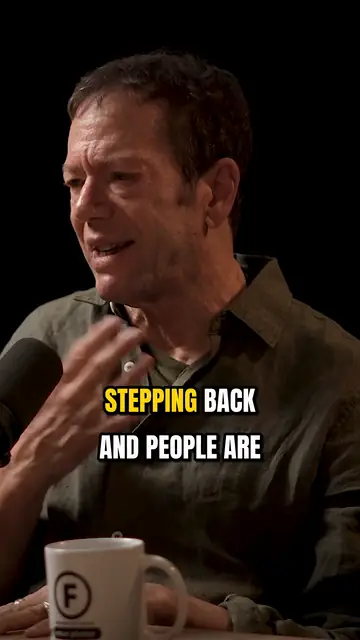
Bold pop. Big upper-case letters. Each word jumps to yellow as it's said. This is the default.
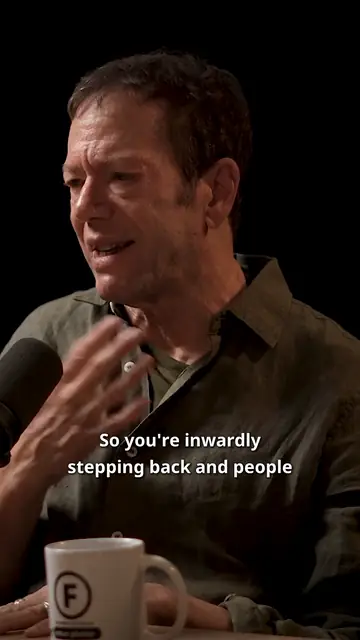
Clean. Sentence case, white text on a soft shadow, no highlight. For when you want the words to stay out of the way.
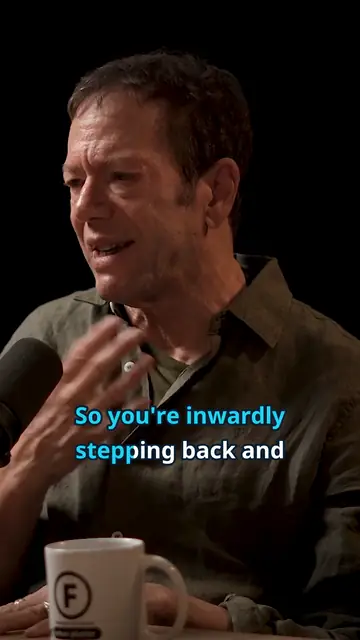
Karaoke. A cyan fill sweeps across each word as it's spoken and stays lit.
Or pick No captions and get clean clips.
Timed to every word
reelaxe transcribes the speech with a timestamp for each word, and the captions follow those times. Lines break at the end of a sentence or at a pause, with at most two lines on screen. A caption clears soon after its last word, so nothing hangs on screen through a silence.
The language is detected from the audio, so you don't have to set one. Devanagari words are set in their own font.
Fix any word before you post
Open a clip in the editor and the captions show up as a transcript you can edit. You can:
- fix a word the transcript got wrong;
- delete a word;
- merge two lines, or split one;
- switch to a different style.
The video plays your changes as you type. That's a close preview. Saving burns them in for real. Your line breaks are kept when you switch styles.
You can't retime words or add new ones. The timing comes from the speech.
Burned in, so they always show
Burned-in captions are part of the picture, not a separate subtitle file. They show up on any app or player, with no caption track to upload.
They sit in a fixed spot for each style. They don't move out of the way of a face.
Which packs include captions
Captions come with the Creator and Studio packs. The free trial has them too. Starter clips come without captions. You can still trim them.
Questions
Can I change the caption style after the clip is made?
Yes. Open the clip in the editor, pick another style and save. A clip stays editable for 14 days after it's cut.
The transcript got a word wrong. Can I fix it?
Yes. Edit the word in the editor and save. The clip is made again with your fix.
Do I need to choose the language?
No. It's detected from the audio.
Can I get clips without captions?
Yes. Pick "No captions" when you start the cut.
What happens if captions fail on a clip?
You still get the clip, without captions. It's flagged so you know to check it.
Try it on your own video
Your first 10 minutes are free, with every feature on and no card.
Try free